
The goal is to get the same sound as a real pacman board.
Hardware
The pacman hardware is actually pretty simple : it consists of 2 proms (256x4bits), some multiplexers, D-flops, and a 4bits adder, everything running at 1.5MHz. This actually implements 3 adders (one 20bits adder, and two 16bits adders) and a wavetable (8 waves of 32 samples). On top of that, the Z80 refreshes the frequencies, volumes and wave selects every 1/60 second, during the vblank interrupt.Running this on a PIC may seem simple, but it's actually challenging, considering the speed. Each addition is done in 24 (20 bits adder) or 20 cycles (16 bits adder), at a clock frequency of 1.5MHz. I'll be using a PIC18, running at 10MHz with the HSPLL enabled, so that gives 10M instructions/second. If we want to implement the 3 voices, that gives approximatively 50 instructions per voice, to do a 20/16 bits addition, a table lookup, and setting a port. And we have to take into account the interrupt overhead...
Pacman sound code disassembled
Armed with the ROM dumps (I own a real MsPacman board !), I started to disassemble the code. Fortunately, other people on the internet have started a similar job (see links below), but nobody ever payed attention to the sound routines. The source code, fully commented, is available here and in the download section.Software refreshes the frequencies and the volumes of the 3 voices during the vertical blanking interrupt (60Hz). Each voice can play an effect or a wave (for song).
Effects are encoded with 8 bytes :
0 : upper 3 bits = frequency shift, lower 3 bits = wave select
1 : initial base frequency
2 : frequency increment (added to base freq)
3 : upper bit = reverse lower 7 bits = duration
4 : frequency increment (added to initial base frequency). Used when repeat > 1
5 : repeat
6 : upper 4 bits = volume adjust type lower 4 bits = volume
7 : volume increment
Songs are coded using a combination of special bytes and tone information. Special bytes allow selection of wave, volume, etc...
Special bytes :
F0 : followed by 2 bytes : address where song continues (allows loop or jump in rom)
F1 : followed by 1 byte : wave select
F2 : followed by 1 byte : frequency increment
F3 : followed by 1 byte : volume
F4 : followed by 1 byte : type
FF : mark end of song
Regular byte :
- upper 3 bits = duration (power of 2 of these bits = duration)
- lower 4 bits = base frequency (using a lookup table)
- lower 5 bits are also assigned to W_DIR, where the 5th bit has a signification
Songs are played on voices 1 and 2 simultaneously. Neither Pacman nor MsPacman play song on channel 3. Effects are played on any channel.
Note that you cannot play songs or effects designed for channel 1 on channel 2 or 3, and vice-versa. This is due to the fact that channel 1 has a 20 bits adder, and therefore frequency range is different.
Implementation on a PIC18
The code has been adapted to run on a PIC micro-controller. One 8-bits port is required to drive the pacman DAC, which is shown below.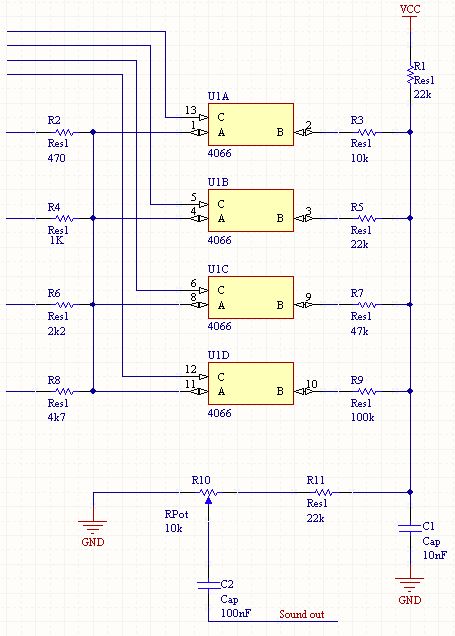
Currently, 2 voices are implemented. Three might be possible by further optimizing the code. The code doesn’t require much explanation. The 20bits and 16bits adders are implemented using the 8-bits adder of the PIC. The wave table is copied in RAM to allow faster access, using the FSR2 register. Several features of the PIC18 are used : the fast-return from interrupt (so we don’t have to save W and Status), memory banks (so the variables of voice 1 are in one bank, the ones from voice 2 are in another. A simple MOVB allows to switch all the parameters at once).
Several other output strategies have been tried, such as using the PWM as a DAC, and using a R2R DAC and the internal multiplier to compute the volume. The PWM solution was not satisfactory, because it was running too slow to produce decent audio. The DAC implementation with an R2R network was fine, but didn’t provide a reduction in pin count.
The code, in its current state, can be browsed here or downloaded from the download section. It is unfinished and is provided as-is. (It checks the values of PORTC in order to select song or effect, and which one should be played).
Links
Pacman hardwareProgramming for the Pac-Man or Pengo arcade platforms